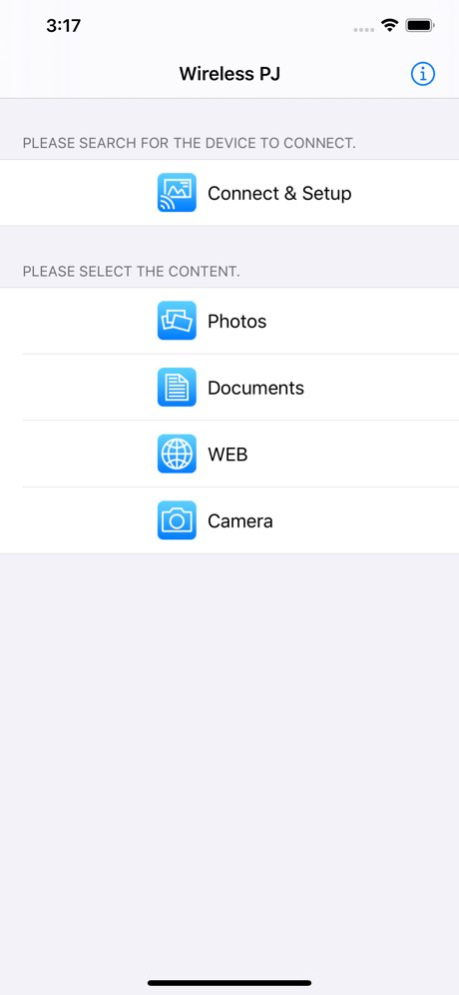
About Panasonic Wireless Projector
Enables wireless projection with your Panasonic projector/display and iPad/iPhone/iPod touch! Panasonic Wireless Projector is an application which enables wireless projection of PDF, PowerPoint, Image files, websites or...
Enables wireless projection with your Panasonic projector/display and iPad/iPhone/iPod touch! Panasonic Wireless Projector is an application which enables wireless projection of PDF, PowerPoint, Image files, websites or photos taken by the built-in camera, on your iPad/iPhone/iPod touch to Panasonic wireless compatible projectors/displays via Wi-Fi. You can project documents which are transferred to and shared with iPad/iPhone/iPod touch via iTunes or Images which are stored in Photo Albums or by taking with the built in camera. You can also rotate, zoom in or out by pinching, flicking the pages. You can project websites with the built-in WEB browser. To display a Keynote or PowerPoint presentation in page units, first convert it into a PDF document. See the following website for supported projectors and displays. https://panasonic.net/cns/projector/support/portal/ iOS 9 / 10 / 11 / 12 / 13 tested
Version History - Support iOS 13 Dark Mode - Bug fixes 3.7.0 05/08/2020 - Support iPhone X display - Improve document selection - Bug fixes 3.6.0 02/19/2019 Added support for VueMagic™ compatible projectors. 3.5.0 01/31/2018 Bug fixes. 3.4.1 09/24/2017 - Added QR code connnection - Support for new Live mode - Support for Moderator mode 3.4.0 06/19/2017 Bug fixes 3.3.2 09/09/2016 Bug fixes 3.3.1 12/20/2015 The Simple Connection function has been added. 3.3.0 08/28/2014 Compatible with NTN91000B/W. 3.2.0 06/24/2014 - New App Icon - Support for iOS 7 - Oneshot projection - Pointer function - Support for switching Multi Live Style 3.1.0 10/04/2013 - Now compatible with iOS 6 - Added IP address search and registration - Can now project PowerPoint, Keynote, Word, Excel, Pages, Numbers, Text, RichText file - Supports the multi live mode - Added WEB control functionality - Added motion capture projection - Can now save marker screen image - Added blackboard functionality 3.0.0 11/07/2012 Supports Retina display. 2.0.1 05/02/2012 - Supports multitasking. - Can now project webpages and camera images. - Added marker functionality. - Added image slideshow functionality. - Background color of JPEG images and PDF files can now be modified. - PDF files from Safari or Mail can now be passed to the application. - Now compatible with iOS 5. 2.0.0 10/07/2011 - Support iOS4.3 - Chinese / Japanese localizations 1.0.1 04/26/2011 1.0.0 03/14/2011
Previous Versions
Here you can find the changelog of Panasonic Wireless Projector since it was posted on our website on 2016-09-24 01:01:28.
The latest version is 3.7.0 and it was updated on 2026-10-07 02:57:04. See below the changes in each version.
Panasonic Wireless Projector version 3.7.0
Updated At: 2026-10-07
Changes: Version History - Support iOS 13 Dark Mode
- Bug fixes 3.7.0 05/08/2020 - Support iPhone X display
- Improve document selection
- Bug fixes 3.6.0 02/19/2019 Added support for VueMagic™ compatible projectors. 3.5.0 01/31/2018 Bug fixes. 3.4.1 09/24/2017 - Added QR code connnection
- Support for new Live mode
- Support for Moderator mode 3.4.0 06/19/2017 Bug fixes 3.3.2 09/09/2016 Bug fixes 3.3.1 12/20/2015 The Simple Connection function has been added. 3.3.0 08/28/2014 Compatible with NTN91000B/W. 3.2.0 06/24/2014 - New App Icon
- Support for iOS 7
- Oneshot projection
- Pointer function
- Support for switching Multi Live Style 3.1.0 10/04/2013 - Now compatible with iOS 6
- Added IP address search and registration
- Can now project PowerPoint, Keynote, Word, Excel, Pages, Numbers, Text, RichText file
- Supports the multi live mode
- Added WEB control functionality
- Added motion capture projection
- Can now save marker screen image
- Added blackboard functionality 3.0.0 11/07/2012 Supports Retina display. 2.0.1 05/02/2012 - Supports multitasking.
- Can now project webpages and camera images.
- Added marker functionality.
- Added image slideshow functionality.
- Background color of JPEG images and PDF files can now be modified.
- PDF files from Safari or Mail can now be passed to the application.
- Now compatible with iOS 5. 2.0.0 10/07/2011 - Support iOS4.3
- Chinese / Japanese localizations 1.0.1 04/26/2011 1.0.0 03/14/2011
Panasonic Wireless Projector version 3.7.0
Updated At: 2020-05-08
Changes: May 8, 2020 Version 3.7.0
- Support iOS 13 Dark Mode
- Bug fixes
Panasonic Wireless Projector version 3.7.0
Updated At: 2020-05-08
Changes: 8 May 2020 Version 3.7.0
- Support iOS 13 Dark Mode
- Bug fixes
Panasonic Wireless Projector version 3.7.0
Updated At: 2020-05-08
Changes: - Support iOS 13 Dark Mode
- Bug fixes
Panasonic Wireless Projector version 3.6.0
Updated At: 2019-02-19
Changes: Feb 19, 2019 Version 3.6.0
- Support iPhone X display
- Improve document selection
- Bug fixes
Panasonic Wireless Projector version 3.3.2
Updated At: 2011-03-14
Panasonic Wireless Projector version 3.7.0
Updated At: 1970-01-01
Changes: 2020年5月8日 Version 3.7.0
- Support iOS 13 Dark Mode
- Bug fixes
Panasonic Wireless Projector version 3.7.0
Updated At: 1970-01-01
Changes: 8. touko 2020 Version 3.7.0
- Support iOS 13 Dark Mode
- Bug fixes
Panasonic Wireless Projector version 3.6.0
Updated At: 1970-01-01
Changes: 19 Φεβ 2019 Version 3.6.0
- Support iPhone X display
- Improve document selection
- Bug fixes
Panasonic Wireless Projector version 3.7.0
Updated At: 1970-01-01
Changes: 8 мая 2020 г. Version 3.7.0
- Support iOS 13 Dark Mode
- Bug fixes
Disclaimer
Official App Store Link
We do not host Panasonic Wireless Projector on our servers. We did not scan it for viruses, adware, spyware or other type of malware. This app is hosted by Apple and passed their terms and conditions to be listed there. We recommend caution when installing it.
The App Store link for Panasonic Wireless Projector is provided to you by apps112.com without any warranties, representations or guarantees of any kind, so access it at your own risk.
If you have questions regarding this particular app contact the publisher directly. For questions about the functionalities of apps112.com contact us.